

Features
Everything HealThaali does, written down plainly
No feature-count inflation. These are the screens that exist in the HealThaali app, grouped by what they are actually for — from a two-minute profile setup to the weight trend you check on a Sunday evening.
The short version
Seven pillars
If you only read one section, read this one.
Personalized recipes
Recipes are chosen from your goal, your health profile and the food you actually like eating — not a generic diet list.
Nutrition tracking
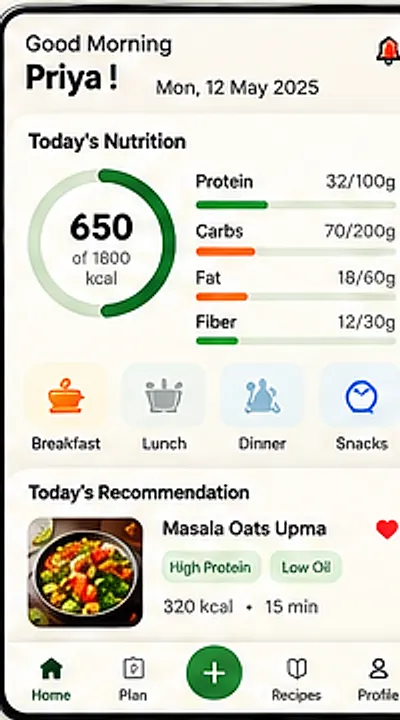
Protein, carbs, fat and fibre for every meal, shown against your own daily targets on one calm dashboard.
AI food intelligence
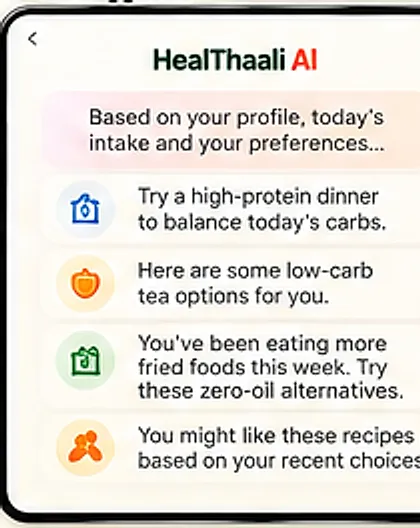
HealThaali AI reads today's intake and suggests the next meal that balances it — like a higher-protein dinner.
Healthy lifestyle
Zero-oil technique and everyday home cooking, so better food fits into a normal week instead of replacing it.
Weight management
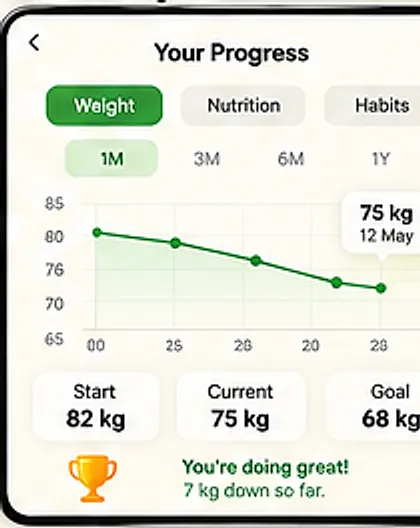
Set a goal weight and watch the trend move. Start, current and goal stay visible, with the change over time.
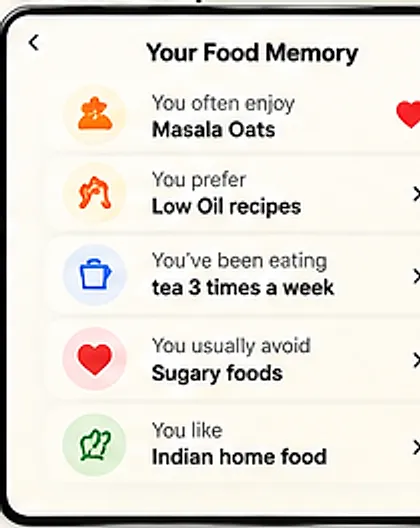
Your food memory
HealThaali remembers what you enjoy, what you prefer, what you avoid and what you eat most often.
Real food, real results
Progress is measured on ordinary Indian meals — rice, dal, sabzi, fry — rebuilt to be lighter and higher in protein.
Personalized to you
A profile, not a preset diet
HealThaali starts by asking a few real questions — age, gender, height, weight, goal, health conditions, food preferences and lifestyle — then keeps adapting from there.
- Guided profile setupBasic information, health and goals, food preferences and lifestyle, in one short flow.
- Goals & targetsChoose a goal such as weight loss and set the target you are working towards.
- Food preferencesTell it Indian, low oil, high protein, spicy — or combinations — and the suggestions follow.
- Food memoryA running, editable picture of what you enjoy, prefer, avoid and eat most often.
Nutrition you can see
Numbers without the spreadsheet
The dashboard, meal plan, logging and recipe detail screens all speak the same language, so the day's numbers are one glance away.
- Home dashboardToday's calories against your target, plus protein, carbs, fat and fibre, and a recommendation for the next meal.
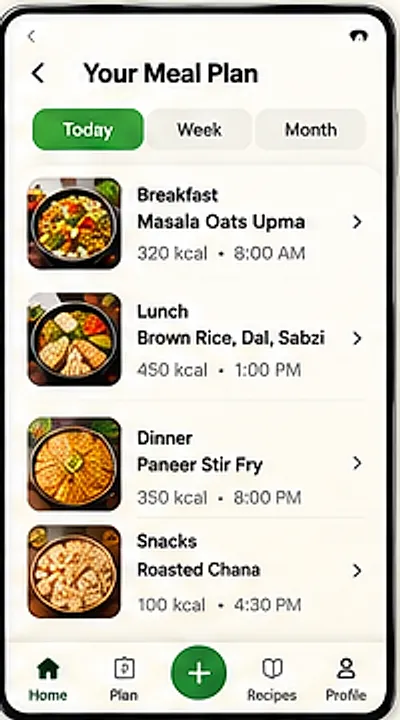
- Meal planBreakfast, lunch, dinner and snacks laid out for the day, and switchable to week or month view.
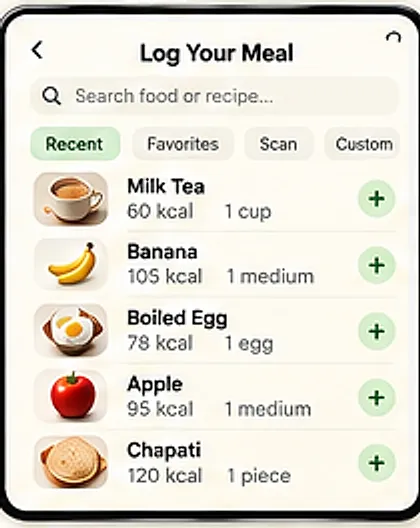
- Food loggingSearch a food or recipe, or pick from recent and favourites, and log it in a couple of taps.
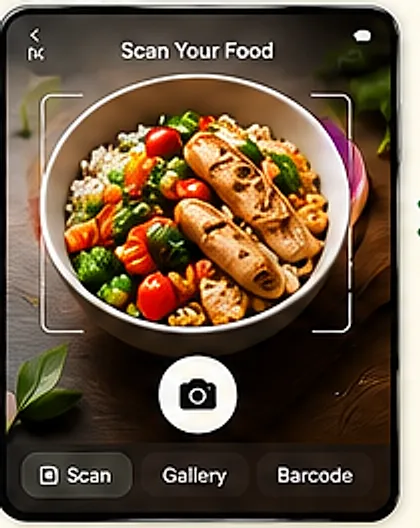
- Scan foodPoint the camera at a plate, or use gallery and barcode, when typing is more effort than eating.
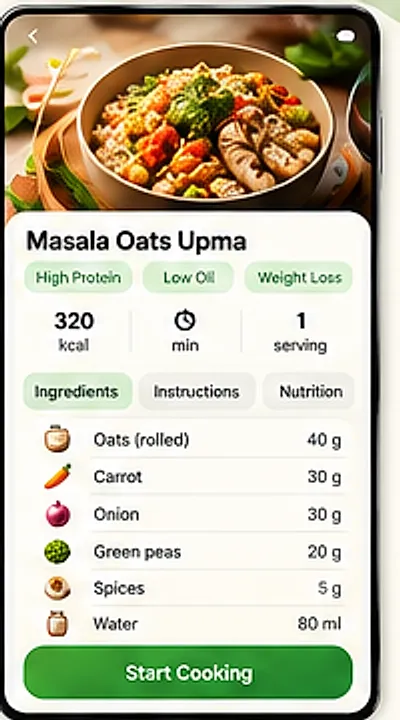
- Recipe detailIngredients, instructions and nutrition per serving on one screen, with Start Cooking to follow along.
- One experience, every screenThe same account and the same data whether you are on the phone or in the browser.
Guidance, not guesswork
HealThaali AI reads the day for you
Instead of another chart, the assistant turns what it already knows into a next step — based on your profile, today's intake and your preferences.
- Balancing suggestionsGot most of your carbs early? It will suggest a higher-protein dinner rather than a lecture.
- Lighter swapsAlternatives for drinks, sweets and fried favourites, offered as options rather than bans.
- Pattern awarenessIf fried food has crept up this week, it points at zero-oil versions of the same dishes.
- Learns from your choicesRecommendations follow the recipes you keep coming back to, not a fixed template.
Progress over perfection
Watch the trend, not one bad day
Your Progress tracks weight over a month, three months, six months or a year, and keeps the start, current and goal visible.
- Weight trendA weight line with your start, current and goal weight called out, plus how far you have come.
- Nutrition historySwitch the same view to nutrition or habits to see what actually changed.
- Notifications & remindersNudges for meals and logging, configurable in Settings so they help instead of nag.
- Ranges that suit real life1M, 3M, 6M and 1Y ranges, because week-to-week noise is not progress.
Your data, your call
Privacy is a screen in the app, not a slogan
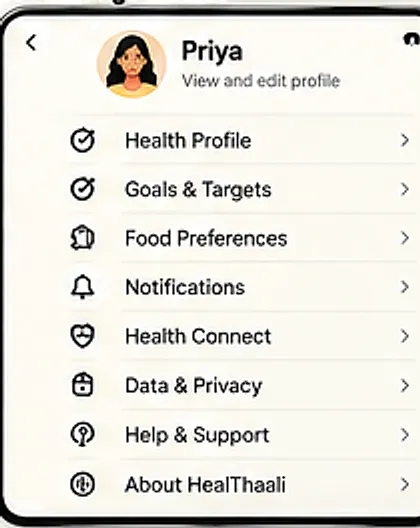
HealThaali keeps Data & Privacy in Settings, alongside Help & Support, so the controls sit where you would look for them.
- Data & Privacy controlsA dedicated section in Settings, described in full in the privacy policy.
- Account deletionA documented route to delete your account and the data attached to it.
- Settings that stay putHealth profile, goals, preferences, reminders, connected services and about — all in one place.
- Health ConnectOptional connection to your platform health store, so you decide whether to share step and activity data.
Straight from the app
The screens these features live on
Captured from the HealThaali app design — not marketing renders.
Scope
What HealThaali is not
HealThaali also does not publish ratings, download counts or customer numbers on this site. If a number is not verifiable, it does not appear here.
Questions
Common questions
What does HealThaali actually do?
Do I have to weigh and calculate everything myself?
What is HealThaali AI?
What is “Food Memory”?
Is HealThaali only for Indian food?
Can I use it if I have a health condition such as diabetes?
Where can I use it — phone, web, or both?
Is my health data private?
Pick a feature and try it on a real meal
The fastest way to judge HealThaali is to log one breakfast and see what it suggests for dinner.
HealThaali is in active development. Links go live the moment the app is published — until then these buttons are switched off on purpose rather than pointing at a placeholder.